5 WordPress Pain Points Small Businesses Can Solve Faster With AI
Small business owners often struggle with WordPress design, speed, maintenance, content, and learning curve issues. See how AI agents help solve these faster.
Running a small business website on WordPress often means juggling design tweaks, speed complaints, plugin updates, and content edits on top of everything else. A 2026 survey of more than 7,000 small businesses found that owners consistently struggle with the same handful of WordPress pain points, and most wish they had a faster way to deal with them. The good news is that a new generation of AI agents can take real action inside a WordPress dashboard, not just suggest what to click. This guide walks through the five most common pain points, what they cost you in time, and how an AI agent connected to your site can shorten each one.
Key Takeaways
- Design updates and performance optimization are the top two WordPress pain points, cited by roughly a third of small business owners.
- Technical maintenance, content updates, and the platform's learning curve round out the five issues that consume the most time.
- Modern AI agents for WordPress can execute real changes, such as installing themes, clearing caches, and publishing pages, rather than only offering written advice.
- Picking the single pain point that costs you the most hours each month is the best starting point for adopting AI assistance.
The Five Most Common WordPress Pain Points
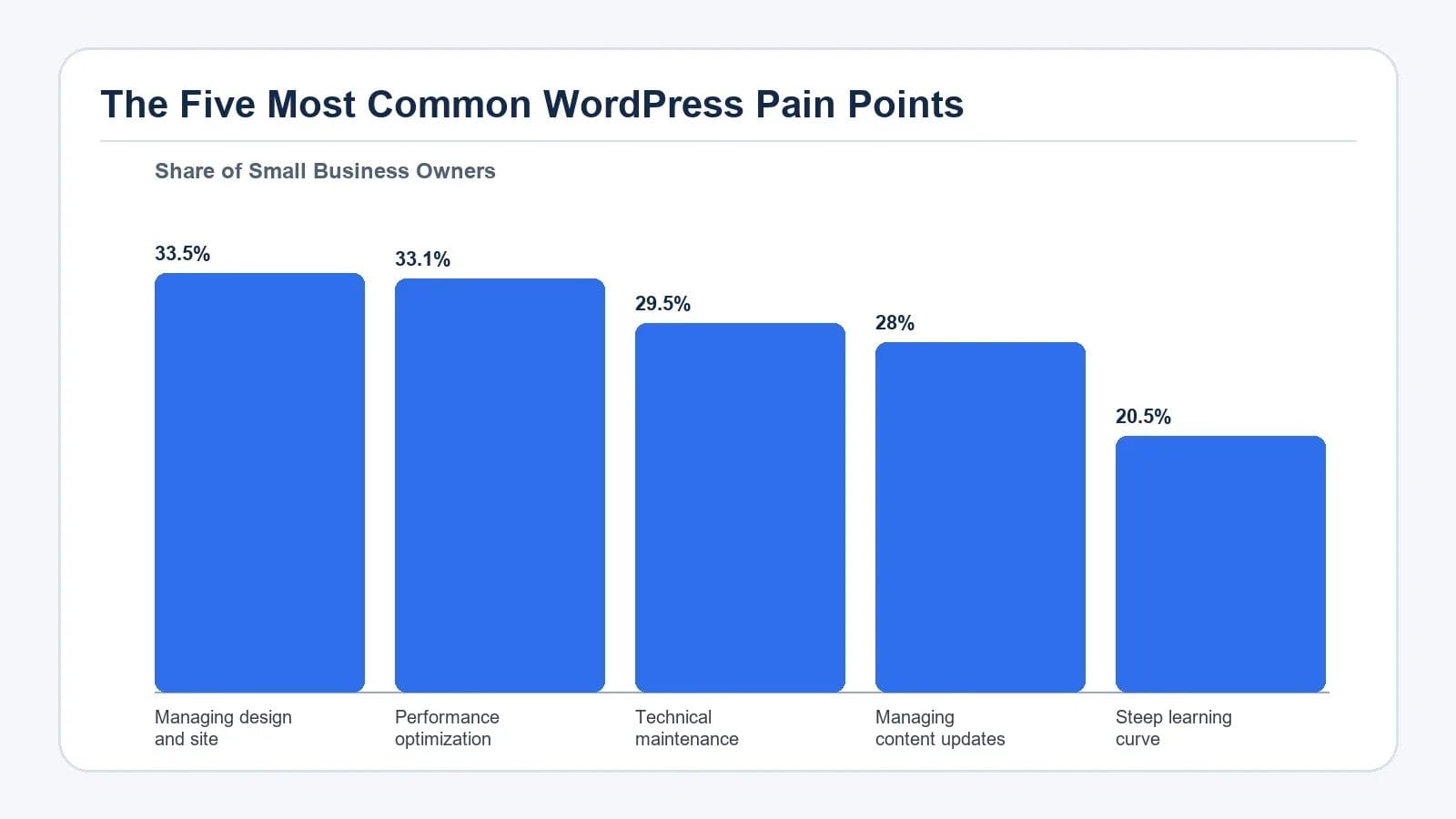
Before choosing a tool, it helps to name the problem clearly. The survey results give a useful priority order so you can decide where AI support will pay off first.
| Pain Point | Share of Small Business Owners | Typical Time Cost |
|---|---|---|
| Managing design and site updates | 33.5% | Hours of menu navigation per change |
| Performance optimization | 33.1% | Ongoing diagnostics and fixes |
| Technical maintenance | 29.5% | Plugin, theme, and core updates |
| Managing content updates | 28% | Drafting, editing, and publishing |
| Steep learning curve | 20.5% | Research time for every new task |
These categories overlap. A slow site may stem from unmaintained plugins, and a confusing content workflow often traces back to the learning curve. Still, treating each as a separate workstream helps you decide which AI capability to try first.
1. Managing Design and Site Updates
Swapping a hero image, adjusting spacing, or rebuilding a navigation menu sounds small until you start. One wrong menu setting can also leave visitors with broken links.
An AI agent connected to WordPress can take these jobs in plain language. Early users have reported turning roughly eight hours of structural work into about forty minutes using this approach.
2. WordPress Performance Optimization
Speed is the second most cited pain point, and the hard part is usually diagnosis. The task lands in the "I should look into that" pile while visitors quietly leave.
An AI agent that links directly to your site can run the check for you. Ask a simple question such as "Is my website running as fast as it should be?" and the agent inspects the site, then reports what it found. From the same chat, you can ask it to clear caches, replace oversized images, or flag plugins that load on every page. For a deeper look at speed tuning, see our guide on why is my WordPress site slow how to fix it.
3. Technical Maintenance
Keeping WordPress core, themes, and plugins current is essential for security and stability, yet it is the kind of chore that gets delayed. Owners worry that an update will break a layout, and they often have no clear checklist for what to test afterwards.
An AI assistant can take over the routine side of maintenance by listing outdated components, applying updates during a low-traffic window, and confirming that key pages still render correctly. For sites that also rely on object caching for speed, an object caching WordPress upgrade plan is worth reviewing alongside any maintenance workflow.
4. Managing Content Updates
Content work is rarely just writing. Surveyed owners put this in the top five because the surrounding tasks add up faster than the writing itself.
Beyond the well-known draft generators, an AI agent that sits inside WordPress can publish a finished post, swap a featured image, adjust categories and tags, and roll back a change if a draft does not look right.
5. The Steep Learning Curve
WordPress rewards curiosity, but only if you have hours to spare. The learning curve is not really about any single feature; it is about needing context for every new decision.
This is where an AI agent changes the dynamic. Instead of reading three tutorials before changing a setting, you describe the outcome you want in chat. The agent handles the steps, and you learn the platform gradually by seeing what it did. For deeper design decisions, our piece on accessibility in WordPress themes easier than you think shows how thoughtful defaults can lift quality without extra effort.
Where AI Should Not Replace You
Even capable AI tools have limits. Treat the AI agent as a fast technician that handles the routine eighty percent of your site work, while you stay accountable for the decisions that carry business risk.
How to Choose Your Starting Point
Rather than trying every feature at once, pick the pain point that costs you the most hours or the most customer complaints this month.
- If your site feels slow, start with performance optimization so the rest of your work is judged on a fast foundation.
- If your design feels dated or your navigation confuses visitors, tackle design and structure updates next.
- If you worry about security or uptime, move technical maintenance earlier in the queue.
- If publishing has stalled, focus on content workflow improvements.
- Use the learning-curve shortcut everywhere by asking the agent to explain each change it makes.
For a wider view of how AI assistants fit into a WordPress stack, our overview of WordPress AI integration architecture and use case walks through the technical decisions behind an agent-based setup.
Action Checklist for Small Business Owners
- List the last five hours you spent on your WordPress site and tag each task to one of the five pain points.
- Pick the pain point that appears most often and define what success looks like, such as faster load times or fewer broken menu links.
- Choose an AI agent that connects directly to WordPress rather than a chatbot that only offers written tips.
- Run one task through the agent, review the result, and keep a short log of what worked and what needed adjustment.
- Schedule a monthly review so routine maintenance, content refreshes, and performance checks become habits instead of fire drills.
Frequently Asked Questions
What are the biggest WordPress pain points for small businesses?
The 2026 small business survey placed design and site updates first at 33.5%, followed by performance optimization at 33.1%, technical maintenance at 29.5%, content updates at 28%, and the platform's learning curve at 20.5%. These five areas cover the bulk of time small business owners spend on their sites.
How can AI help with WordPress performance optimization?
An AI agent connected to your site can check current load speed, identify oversized images and heavy plugins, clear caches, and apply common fixes from a chat interface. This removes the need to read multiple tutorials before making speed-related changes.
Is an AI agent safe to use for WordPress maintenance tasks?
For routine work such as updating plugins, clearing caches, and managing media, an AI agent is generally safe when you review changes afterward. Sensitive areas like payment settings, user roles, and access controls should still be handled manually or reviewed carefully before approval.
Do I need coding skills to use AI for WordPress site management?
No. The main benefit of an AI agent is that it accepts plain-language instructions and handles the steps that would normally require clicking through several admin screens. Owners who can describe what they want in a sentence can usually get the task done.
Which WordPress pain point should I solve first with AI?
Start with the pain point that costs you the most time or causes the most customer complaints. For most small businesses, performance optimization is a strong first choice because faster pages improve every other effort, from content marketing to search visibility.
Conclusion
Small business WordPress sites do not have to drain your week. The five pain points identified across thousands of owners, including design updates, performance, maintenance, content, and learning curve, are well understood, and AI agents now have the reach to act on them directly inside WordPress. Start with the single issue that costs you the most hours, let an AI agent handle the routine work, and keep your attention on the decisions only you can make.