Linux Distros for VPS Hosting in 2026: 9 Options and Selection Tips
A practical 2026 comparison of nine Linux distributions suited to VPS hosting, with RAM needs, support lifecycles, package ecosystems and selection guidance.
The Linux distribution you choose quietly shapes every VPS experience, from how often you patch the kernel to how much RAM your web stack actually has left for traffic. In 2026, the gap between a friendly general-purpose server and a specialist minimal image is wider than ever, and picking the wrong one can mean fighting outdated packages, awkward control panels, or a base footprint that swallows half your plan. This article walks through nine practical options for a VPS host operating system, explains what each one is good at, and offers a short decision framework so the choice matches the workload rather than the hype.
Key Takeaways
- Ubuntu Server LTS remains the safest general-purpose pick thanks to a five-year free security window and the largest tutorial ecosystem.
- Debian and Alpine are the strongest choices when RAM is tight, with Debian targeting stability and Alpine targeting minimal images and containers.
- AlmaLinux and Rocky Linux are the main community RHEL alternatives for cPanel, Plesk and other enterprise stacks.
- Rolling-release distros like Arch and CentOS Stream trade long support windows for constant updates, which suits testing more than production.
- Match the distro to your plan, not the other way around: a 512 MB plan and Fedora Server are a poor combination regardless of features.
What a Linux Distro Actually Controls on a VPS
A Linux distribution bundles the Linux kernel with a package manager, default services, an init system, an update policy and a support lifecycle. On a VPS that bundle decides how packages arrive, how often the kernel is patched, and how long you can run before a major upgrade becomes urgent. The kernel itself traces back to Linus Torvalds' 1991 release and is now maintained through the Linux Foundation, while the distributions around it are packaged by separate teams and companies.
Because most server software today runs on Linux, the practical question is rarely "can it run on Linux" and more often "which family gives me the smoothest upgrade path for the next three to five years." Two more concrete decisions matter most:
- Support length: long-term support (LTS) releases buy you years of free security patches; short-cycle releases force upgrades on a calendar.
- Base footprint: a minimal image can leave a 1 GB plan breathing room, while a full desktop-derived server image can starve the same plan.
Nine Options Worth Considering in 2026
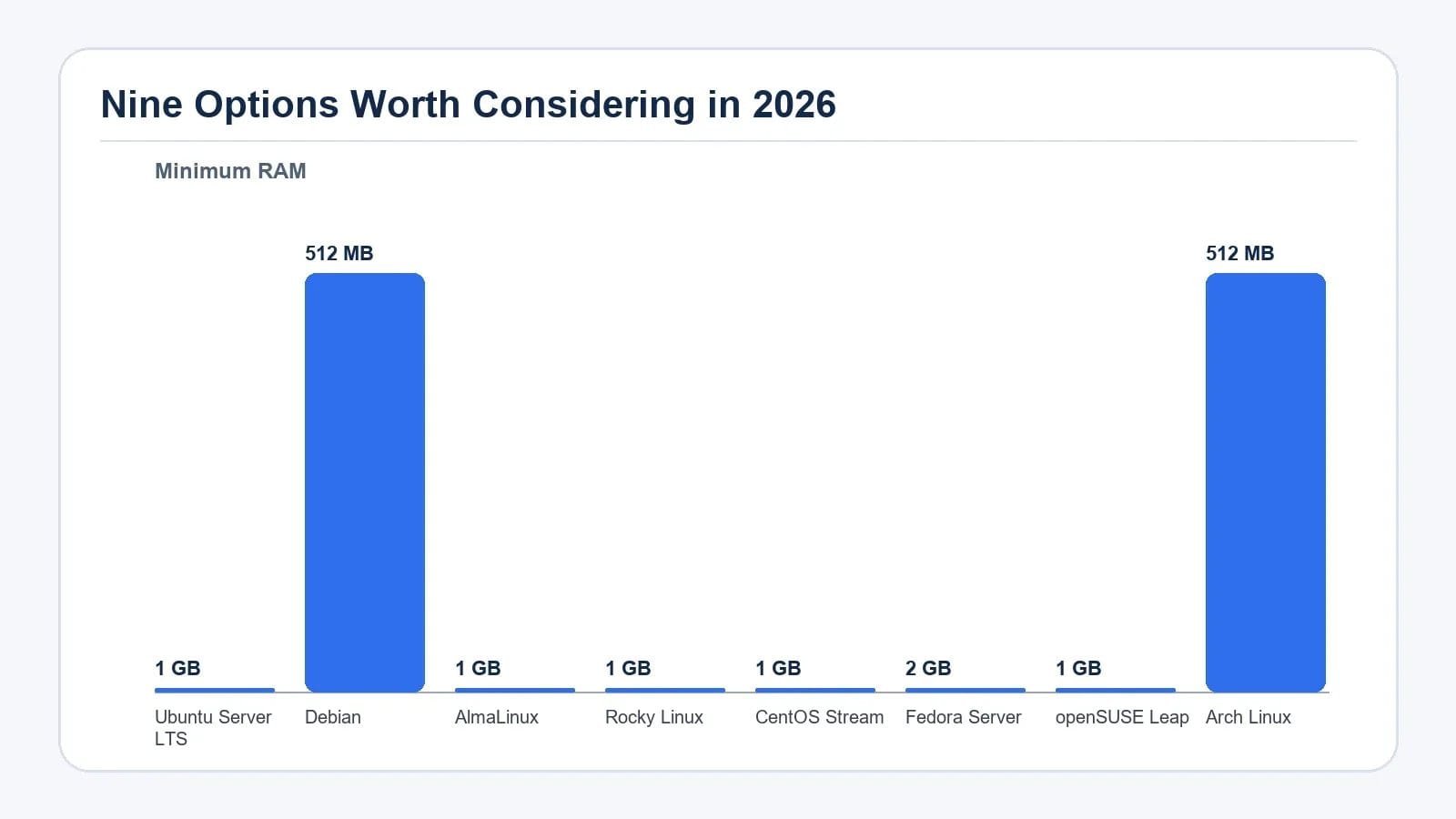
The table below summarizes the nine distributions and what each one is best matched to. Figures reflect the documented support length and minimum RAM guidance reported by each project.
| Distribution | Best fit | Release model | Support length | Minimum RAM |
|---|---|---|---|---|
| Ubuntu Server LTS | General VPS hosting | Point release (~2 year cycle) | 5 years free, 10 with Pro | 1 GB |
| Debian | Stability, low RAM use | Point release (~2 year cycle) | 5 years | 512 MB |
| AlmaLinux | Free RHEL alternative, cPanel | Point release, tracks RHEL | 10 years | 1 GB |
| Rocky Linux | Community RHEL alternative | Point release, tracks RHEL | 10 years | 1 GB |
| CentOS Stream | Testing ahead of RHEL | Rolling within RHEL cycle | Tied to RHEL major | 1 GB |
| Fedora Server | Newest packages and tools | Point release (~6 months) | 13 months | 2 GB |
| openSUSE Leap | SUSE-style stability | Point release (~18 months) | ~18 months | 1 GB |
| Arch Linux | Full control, rolling updates | Rolling release | Continuous | 512 MB |
| Alpine Linux | Lightweight, small VPS plans | Point release | Varies by release | 256 MB |
How to Match a Distro to Your Workload
Rather than chasing the newest feature list, treat the choice as three filters applied in order.
- Resource ceiling: if your plan offers 512 MB or less, lean toward Debian or Alpine. Above 1 GB, most modern server distros are comfortable, and Fedora's 2 GB recommendation becomes realistic.
- Software expectations: control panels like cPanel and Plesk are designed around RHEL-family systems, so AlmaLinux or Rocky Linux is the practical path when those tools are required.
- Maintenance appetite: long-support LTS releases suit teams that want predictable patching; rolling-release distros suit developers who prefer to refresh frequently and stay close to upstream.
Notes on Each Distribution
Ubuntu Server LTS is the easiest on-ramp. Snap packages occasionally draw criticism for being heavier than expected, and some upstream packages lag the very newest releases, but for a general web workload the trade-offs rarely matter.
Debian sits underneath Ubuntu and ships a more conservative package set with longer testing. The trade-off is that newer software versions can take longer to arrive, and there is no commercial support contract behind the project.
AlmaLinux and Rocky Linux both rebuilt the RHEL-compatible community after CentOS Linux was retired. Pick AlmaLinux when you want broader tooling and corporate-style documentation, or Rocky Linux when you prefer the original community-led direction.
CentOS Stream is the rolling preview that feeds into RHEL, so it is well suited to validating software ahead of an RHEL release and less suited to long-running production web hosting.
openSUSE Leap brings SUSE-style stability outside the Red Hat family, with an eighteen-month support window and YaST as a distinctive administration tool. Arch Linux is a rolling-release DIY distro that rewards experienced operators who want total control and constant updates, and penalizes anyone who wants a predictable upgrade calendar.
Alpine Linux uses musl libc and the apk package manager to produce very small images, often under 256 MB of RAM, which makes it a common base for containers and for VPS plans where every megabyte is spoken for.
Frequently Asked Questions
Which Linux distro is best for a small VPS with 512 MB of RAM?
Debian is the most practical general-purpose choice on a 512 MB plan because it ships a small base image, conservative defaults and a five-year support window. Alpine Linux is even lighter and works well on 256 MB, but its smaller community and musl-based toolchain make it better suited to experienced operators or container hosts.
Is Ubuntu Server LTS still the safest default in 2026?
For most VPS users, yes. Ubuntu Server LTS gives five years of free security patches, broad control-panel and DevOps tooling support, and the largest tutorial ecosystem of any server distribution. The two main reasons to look elsewhere are strict RHEL compatibility for cPanel and Plesk, in which case AlmaLinux or Rocky Linux is the better match, or extreme resource limits, where Debian or Alpine leave more room for applications.
Should I pick AlmaLinux or Rocky Linux for a cPanel VPS?
Both are RHEL-compatible community rebuilds with roughly ten years of support, and cPanel and Plesk officially support both. AlmaLinux tends to attract more enterprise-oriented tooling and corporate documentation, while Rocky Linux is positioned as the original community-led continuation. For most hosting workloads the operational experience is similar, so the choice often comes down to which provider's image your host offers first.
Are rolling-release distros like Arch Linux safe for production servers?
Rolling releases can be stable in practice, but they remove the predictable patching calendar that LTS releases provide. On a production VPS that means you need a tested snapshot or container image, a reliable backup, and an operator comfortable debugging a kernel or library update at short notice. For customer-facing sites with a small operations team, an LTS point release is usually the lower-risk option.
How do I keep my VPS distro secure over its support window?
Install unattended security updates where the package manager supports them, enable automatic kernel patches through your provider when available, and keep an off-host backup that is independent of the running distribution. Re-image the VPS rather than upgrading in place at the end of the support window, and review release notes for the kernel and any services exposed to the internet.
Conclusion and Action Checklist
The right Linux distribution for a VPS is the one that matches your plan size, your software stack, and how often you want to touch the operating system.
- Confirm the plan's RAM headroom against the distro's minimum, leaving memory for the application and any control panel.
- Check whether your hosting stack, such as cPanel, Plesk, Docker or a specific web server, requires a particular distribution family.
- Prefer an LTS or long-support point release for any customer-facing workload.
- Turn on automatic security updates and an off-host backup before exposing the VPS to the internet.
- Plan the next re-image at the end of the support window instead of an in-place upgrade.
For readers who want a deeper comparison of RHEL-family options, the almalinux 8 vs 9 vs 10 for VPS hosting guide breaks down the upgrade path in more detail. If you are still sizing a plan, Managed Cloud VPS Hosting outlines the resource tiers that pair well with these distributions.